M10 8-in-1 Cordless Vacuum: Smart LED Daily Cleaning
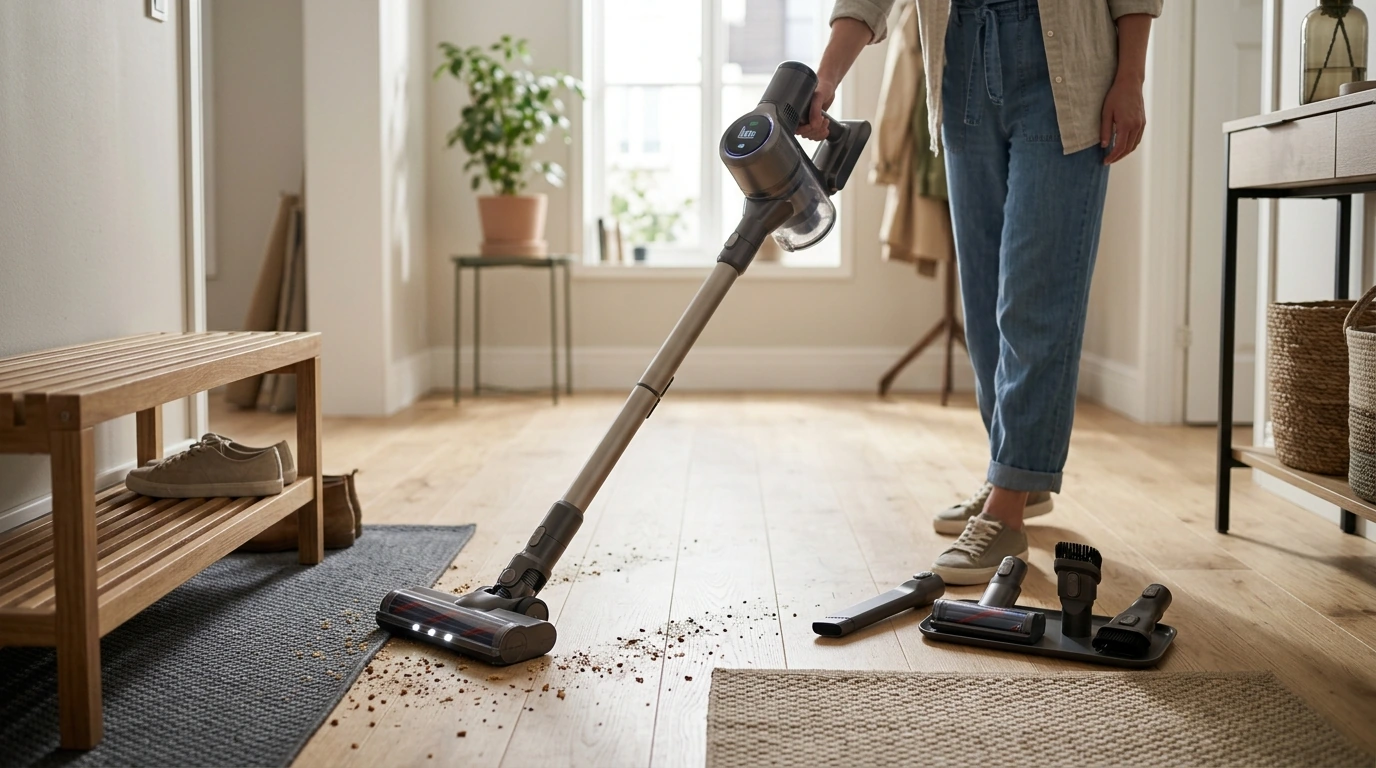
M10 Cordless Vacuum Cleaner with Smart LED Display (8-in-1 Handheld): Features, Daily Use, and Care
A cordless vacuum with a smart LED display can make routine cleaning faster by showing real-time status and guiding basic upkeep. The M10 8-in-1 handheld system is designed for quick switches between floors, furniture, tight corners, and car interiors—without dragging cords or guessing battery life.
What the M10 is designed to do
- Support everyday pick-ups: crumbs, dust, hair, and tracked-in debris in high-traffic zones.
- Convert between handheld and extended reach configurations for floors, upholstery, stairs, and vehicles.
- Use the smart LED display as a quick-check dashboard for battery level and operating status.
- Prioritize convenience for small spaces, apartments, dorms, and spot-cleaning between deeper cleans.
For shoppers comparing compact cordless options, the goal is simple: grab it, clean fast, store it easily, and keep performance consistent with minimal fuss. The M10 leans into that “daily driver” role.
8-in-1 versatility: where the handheld format shines
- Floor-to-ceiling cleaning: switch from hard floors to rugs and then to shelves or corners with a quick attachment change.
- Furniture and upholstery: handheld mode helps target sofa seams, cushions, and pet-favorite spots.
- Stairs and landings: lighter handheld handling reduces awkward angles compared with corded uprights.
- Car detailing: reach footwells, seat tracks, cup holders, and trunk corners more easily than with full-size vacuums.
- Tight spaces: edges, baseboards, and under-seat areas benefit from compact tools and controlled suction.
That quick-switch workflow matters most during “micro-cleaning” moments—after dinner, by the litter box, around entry rugs, or when a snack explodes in the back seat.
Smart LED display: what it helps with during real cleaning
- Battery awareness: check remaining charge at a glance before starting a room or moving to the car.
- Operating status: confirm the unit is running in the intended mode without stopping to inspect controls.
- Basic maintenance cues: a display can reduce guesswork by signaling when performance drops or attention is needed (varies by model behavior).
- User-friendly handoffs: clearer status indicators help when multiple household members share the same vacuum.
In day-to-day use, the display becomes less of a “gadget” and more of a pacing tool—helping decide whether to finish the hallway now or recharge before tackling the car.
Everyday performance considerations (without overpromising)
- Hard floors: focus on fine dust, tracked grit, and crumbs along edges and around table legs.
- Low-pile rugs: practical for frequent refreshes; deeper debris may require slower passes and repeat strokes.
- Pet hair: best results come from short, overlapping passes and frequent bin emptying to keep airflow strong.
- Noise and comfort: handheld use benefits from a balanced grip, especially for stairs and above-floor cleaning.
- Real-world runtime: runtime depends on suction level, tool used, and debris load; checking the display before large jobs helps plan breaks.
Quick expectations by surface type
| Surface | Best use | Technique tip |
|---|---|---|
| Hard floors | Dust, crumbs, hair | Use steady forward passes; finish edges last |
| Low-pile rugs | Daily refresh, light debris | Slow down and overlap strokes |
| Upholstery | Cushions, seams, pet spots | Use short pulls; lift tool to avoid snagging |
| Car interior | Footwells, seat tracks | Start with crevices; finish with broader nozzle |
Filtration and indoor air basics
- Sealed airflow and filtration quality influence how much fine dust stays captured versus re-entering the room.
- For allergy-prone households, consistent filter cleaning and timely replacement matter as much as suction.
- Emptying the dust cup carefully reduces dust clouds; consider doing it outdoors or near a trash liner.
- If the vacuum supports washable filters, allow complete drying before reinstallation to prevent odor and performance issues.
For broader guidance on indoor air quality and household cleaning basics, see the EPA’s indoor air quality resources and the CDC’s cleaning recommendations.
Setup and first-week tips to keep suction consistent
Maintenance routine that takes minutes
Simple upkeep schedule
| Task | How often | Why it matters |
|---|---|---|
| Empty dust cup | After sessions | Maintains airflow and suction |
| Remove hair/fibers from inlets/tools | Weekly (or more with pets) | Prevents clogs and drag |
| Clean or wash filters (as applicable) | Weekly to monthly | Improves fine-dust capture and performance |
| Inspect seals and joints | Monthly | Reduces air leaks and suction loss |
Common issues and quick checks
When the M10 8-in-1 is a strong fit
Shop in-stock picks
- M10 Cordless Vacuum Cleaner with Smart LED Display, 8-in-1 Handheld Vacuum
- Travel Solo With Confidence: A Practical Guide to Overcoming Fear and Anxiety for Solo Travelers
- Empower Your Inner Voice – A Practical eBook Guide on how to overcome self doubt, Build Confidence, and Strengthen Mindset for Personal Growth
FAQ
What does the smart LED display typically show during use?
Smart LED displays commonly show battery level and basic operating status, and some models also use icons or alerts to flag reduced airflow or maintenance needs. The exact indicators and behavior depend on the specific unit.
How often should the filter be cleaned or replaced?
Plan on a quick weekly check and a deeper clean monthly, adjusting more often in homes with pets or heavy dust. If the filter is washable, let it dry completely before reinstalling, and follow the product manual for replacement timing.
Is a handheld cordless vacuum enough for pet hair and car interiors?
For spot cleaning on upholstery, entryways, and car footwells, a handheld cordless vacuum can be a strong everyday solution when used with overlapping passes and regular bin emptying. For deeply embedded hair in thicker carpet or large, whole-home sessions, a heavier-duty vacuum may still be helpful.







Leave a comment